
If your team is labeling sensor time-series data for machine learning in 2026, the tool choice comes down to five things: preprocessing depth, multimodal alignment, autolabeling hooks, reproducible provenance, and clean export into Python ML pipelines. Most tools cover one or two. The gap shows up the moment you try to reproduce a dataset after someone tweaks a fill method, resampling rule, or smoothing order.
This guide compares the tool categories ML teams actually evaluate—MATLAB Signal Labeler, historian-first platforms like Seeq/TrendMiner, visual analytics tools like Visplore, and sensor-first labeling platforms like dFL—and ends with a checklist you can run in a one-hour demo.
If you want the longer breakdown, start with:
- Top Data Labeling Tools Data for Time-Series and Sensor Data
- How to Label Time-Series and Sensor Data at Scale.
What you’re really buying (and what most tools miss)
- A harmonization pipeline you can replay: trim, fill missing data, resample to a common time base, smooth/denoise, normalize—with parameters captured so someone else can reproduce the dataset later.
- Labeling primitives that match signals: point events, spans/episodes, attributes, and templates you can reuse across records.
- Autolabeling you can actually integrate: rule-based pickers, statistical detectors, and hooks for PyTorch/ONNX—so manual labeling becomes the seed, not the whole job.
- Provenance, not screenshots: you need an audit trail for preprocessing + labeling + model inference. Otherwise “what changed?” becomes archaeology.
- Exports that match your downstream stack: Parquet/CSV/JSON, plus ML tooling integration (e.g., MLflow) so labels and transforms travel with training runs.
The 4 categories of time-series labeling tools teams end up comparing
1) MATLAB Signal Labeler (DSP-first, MATLAB-first)
MATLAB’s Signal Labeler app is the incumbent in DSP-heavy environments: wide preprocessing function coverage and tight integration with the rest of MATLAB. If your end-to-end workflow lives in MATLAB, it’s a strong default. If your training stack is Python, it often turns into a translation layer problem (scripts, exports, reformatting, and version mismatch). Pricing is quote-based—start at MathWorks’ pricing & licensing page.
2) Historian-first platforms (Seeq, TrendMiner)
These excel when your data already lives in a process historian (PI/PHD/IP.21 equivalents) and the job is plant-scale monitoring, event capsules, and pattern search. They are not built for kHz-range, file-based research workflows where you need DSP-level preprocessing before labels mean anything.
3) Visual analytics / brushing tools (Visplore)
Fast for manual “brush and paint” labeling on massive tables and exploratory analysis. Less strong when you need deeper signal processing, multimodal fusion, or a first-class autolabeling plugin surface.
4) Sensor-first labeling + harmonization platforms (dFL)
Sensor-first tools treat preprocessing, labeling, and export as one pipeline. dFL (Data Fusion Labeler) sits in this category: a visual harmonization DAG, manual labeling, autolabel SDK hooks, and provenance tracking designed for reproducible datasets.
Comparison matrix: what matters for sensor ML (not generic “labeling”)
| Capability | MATLAB Signal Labeler | Seeq / TrendMiner | Visplore | General labeling tools (Scale/Labelbox) | dFL |
| DSP preprocessing depth (denoise, smooth, resample, normalize) | Strong | Limited | Limited–moderate | Weak | Strong |
| Multimodal alignment (multi-rate sensors, common time base) | Moderate | Historian-rate focus | Moderate | Weak | Strong |
| Autolabeling plugin surface (PyTorch/ONNX + custom logic) | Possible, MATLAB-centric | Notebook-centric | Possible via scripts | Model-assist varies | Strong (SDK + ONNX) |
| Provenance for transforms + labels (replayable history) | Partial | Strong governance, ops focus | Limited | Varies | Strong (provenance DAG) |
| Python-native export + ML tooling integration | Friction unless MATLAB-first | Possible, enterprise stack | Good round-trip | Often API-first | Strong (Python SDK + MLflow) |
Note: Historian platforms often have strong operational governance/audit features; in this guide, “provenance” means replayable dataset lineage across transforms + labels + model inference, not dashboard audit trails. (FAIR also explicitly calls out provenance in reusable metadata.)
What should a time-series labeling tool do (beyond “draw spans”)?
Labeling is the visible part. The expensive part is everything before and after a human marks an event: ingest, alignment, preprocessing, automation, and export.
Quick picks (2026)
- If you need DSP preprocessing + provenance + Python-native export: dFL
- If your whole workflow stays inside MATLAB: MATLAB Signal Labeler
- If you already run a plant historian and need operations analytics: Seeq or TrendMiner
- If you want fast manual brushing on large tabular time series: Visplore
Harmonize first, label second
If signals aren’t aligned, labels don’t survive reprocessing. A serious tool has an order-aware pipeline for trim → fill → resample → smooth/denoise → normalize, with preview and repeatability.
For the system-level view, see Data Harmonization for Multimodal Time-Series: A System-Level Approach. If you want concrete failure modes, read Preprocessing Order in Time Series ML Pipelines: A Hidden Source of Failure.
dFL is built around a visual pipeline plus a provenance DAG that records exactly how a labeled dataset was produced. For the underlying design rationale, start with the dFL arXiv paper.
Label across signals, not just on one plot
Time-series ground truth is usually cross-signal: commanded vs observed (robotics), multiple diagnostics (fusion), thermal + acoustic + photodiode (manufacturing). The tool should make multi-signal context the default, not a workaround.
Scale with autolabeling (without breaking traceability)
You don’t manually label hundreds of records. You label enough to define the pattern, then you scale it and review candidates. This is the pattern described in Labeling: How to Label Time-Series and Sensor Data at Scale.
In dFL, scaling is done through the Autolabeler SDK, and model/dataset iteration can be tracked through MLflow integration.
Export in formats that survive ML pipelines
CSV is fine for eyeballing, but ML pipelines usually want columnar export plus metadata.
dFL supports export to Parquet, CSV, and JSON so labeled data can be consumed by training code without losing schema.
The 2026 evaluation checklist (use this during demos)
A) Data ingestion and weird-real-world inputs
Ask if the tool can ingest your formats without rewrite-the-world ETL. In dFL, ingestion is handled by Python Data Providers that map custom formats into consistent records and graph configs.
B) Harmonization and DSP depth
- Fill strategies for NaNs and gaps, including edge handling
- Resampling to a common time grid (with explicit algorithms, not silent defaults)
- Smoothing/denoising that reflects what engineers actually use
- Per-signal normalization choices and parameter capture
C) Labeling UX that matches ML use
- Events and spans with attributes (confidence, regime, cause)
- Multi-signal labeling without duplicating work
- Edit history that survives team handoffs
D) Autolabeling + review loop
- Built-in candidate detection for a fast first pass
- A plug-in interface for your heuristics or models
- A review flow to confirm/reject candidates
E) Provenance (the difference between “labels” and “datasets”)
If you can’t answer “exactly how was this label produced?” you can’t debug drift. Start by checking whether the tool has a true provenance graph like dFL’s provenance DAG.
F) Collaboration and deployment
If more than one person touches the dataset, make sure there’s a credible multi-user story. For a quick pilot, start with the dFL free trial; for budgeting, reference dFL pricing.
G) Exports and ML integration
Confirm you can export labeled data in production-friendly formats and connect it to experiments. dFL links these pieces through export formats and MLflow.
What “good” looks like on real datasets
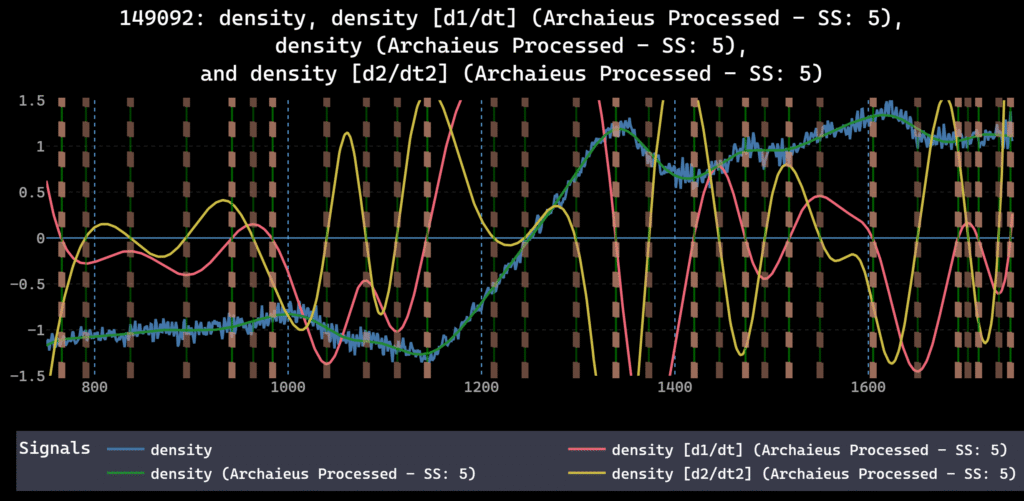
Fusion: The DIII-D tokamak workflow is a stress test—dozens of diagnostics, high sampling rates, and event labeling that needs to remain consistent across shots.
Robotics: The LeRobot SO-100 use case is about relationships between commanded and observed signals, which forces alignment discipline and makes “multi-signal truth” unavoidable.
Manufacturing: NIST LPBF is multimodal fusion by default: thermal, acoustic, optical, and machine commands tied to defect labeling workflows.
Why dFL is the default pick for sensor-first ML teams
dFL is built around a visual harmonization DAG (trim → fill → resample → smooth/denoise → normalize), plus manual labeling and an autolabel SDK for scaling. The point isn’t that you never write code—it’s that you stop using scripts as the system of record. The DAG is the record.
If you want to evaluate it quickly, start with the Getting Started guide and the Python SDK reference. When you’re ready to run a real dataset end-to-end, export formats are documented here: Parquet/CSV/JSON export.
Run a one-hour trial like an engineer
- Ingest 2–5 representative records with different conditions and at least one missing segment.
- Build a harmonization pipeline and confirm you can reorder steps and the tool records the change.
- Manually label 10–30 events across multiple signals.
- Run an autolabeler and review candidates.
- Export to Parquet (or equivalent) and confirm labels + preprocessing metadata survive.
Keep the right pages open while you test: documentation home, Data Providers, Autolabeler SDK, provenance DAG, export formats, and MLflow integration.
You can Try dFL free with your own dataset.
Or start at the dFL product page to see where it fits in your stack.
FAQ: time-series-labeling-tools
What is time-series-labeling-tools?
It’s software for turning raw sensor time series into labeled datasets (events, spans, classes) with aligned sampling and exportable metadata.
How do you label multichannel time series without losing alignment?
Resample to a common time base first, then label on the fused view. The label timestamps should live in the same coordinate system as the harmonized data.
What should you export for training?
Export the harmonized signals plus labels and provenance metadata (operations + parameters). Parquet + JSON sidecars is a common pattern for reproducibility.
When is MATLAB Signal Labeler the right choice?
If your team stays inside MATLAB for both preprocessing and modeling, and you don’t need concurrent multi-user collaboration.
Do I need a dedicated time-series labeling tool if I already have notebooks?
If you’re working solo on a short-lived dataset, notebooks can be fine. The minute you have multiple sensors, multiple people, or an audit/reproducibility requirement, notebooks become the worst place to store the “truth” of preprocessing and labels. A dedicated tool becomes a shared, replayable system of record.
Is dFL a replacement for MATLAB?
No. dFL is positioned as a replacement for MATLAB Signal Labeler specifically in workflows where MATLAB’s single-user GUI and MATLAB-first ecosystem become friction for Python-first ML teams.
Can I keep my pipeline in Python?
Yes. dFL is Python-native and exposes a Python SDK plus MLflow integration so preprocessing parameters and labels can be logged alongside training runs.
External sources (for editors)
- MathWorks pricing and licensing: https://www.mathworks.com/pricing-licensing.html
- MathWorks Signal Processing Toolbox overview: https://www.mathworks.com/products/signal.html
- ACM TIST: Evaluating LLMs as virtual annotators for time-series physical sensing data: https://dl.acm.org/doi/10.1145/3696461
- arXiv: Universal Time-Series Representation Learning (survey): https://arxiv.org/html/2401.03717v1